
A Python string (str) is an immutable sequence of Unicode code points, and a single character is just a length-1 string. Every number below was measured on this machine, on CPython 3.8.20, 3.10.12, and 3.12.3. So the speed claims carry a version stamp, because f-string timings drift between releases.
Most tutorials tell you strings are immutable and move on. This one measures what that immutability actually costs, and where the usual "always join, never +=" advice quietly falls apart.
Key takeaways
- Clean
s += piecein a loop is linear, and it beatlist.appendplus"".joinon CPython 3.8 (4.914 ms vs 6.043 ms) and 3.10 (3.125 vs 3.558) for n=100,000. - The real
+=trap is aliasing. The same 40,000-iteration loop went from 1.01 ms to 2570 ms, a 2554x blowup, once each intermediate string had a second reference. - One astral emoji in a 1000-character ASCII string pushes its memory from 1049 to 4076 bytes, a 3.9x jump from a single character (PEP 393).
- f-strings are the fastest formatter (95.3 ns on 3.12).
.format()is the slowest (148.9 ns), which is measured proof of a claim every beginner guide asserts flat. - Substring
"NEEDLE" in haygot about 3.5x faster in 3.11/3.12 (293 ns down to 84.9 ns), so any speed ranking without a version stamp is already rotting.
What is a Python string?
A Python string is the built-in str type: an immutable sequence of Unicode code points. You write one with single, double, or triple quotes, and the quote style is interchangeable. Python has no separate character type, so a single character is simply a length-1 string, and if you try to reassign one character, you get a TypeError.
s = 'hello'          # single quotes
t = "hello"          # double quotes, same thing
u = """multi
line"""              # triple quotes for multiline
Since Python 3, every str is Unicode by default, so "café" and "你好" are strings with no extra setup. And because there's no char type, s[0] on "hello" hands you back "h", another string of length 1.
The immutability is the part beginners trip on. A str can't be edited in place, and Python will tell you so:
s = "hello"
s[0] = "H"           # TypeError: 'str' object does not support item assignment
To "change" a string you build a new one. That constraint shapes almost everything below, from how strings get concatenated to how much memory they eat.
Indexing and slicing strings
Python strings index from zero, so s[0] is the first character and s[-1] is the last. A slice s[start:end] includes the start and excludes the end. Add a step, and s[::-1] reverses the string. An out-of-range index raises IndexError, but an out-of-range slice just clamps quietly and hands you what it can.
s = "python"
s[0]      # 'p'
s[-1]     # 'n'
s[1:4]    # 'yth'   (index 4 excluded)
s[::-1]   # 'nohtyp'
s[10]     # IndexError
s[2:99]   # 'thon'  (no error, clamps)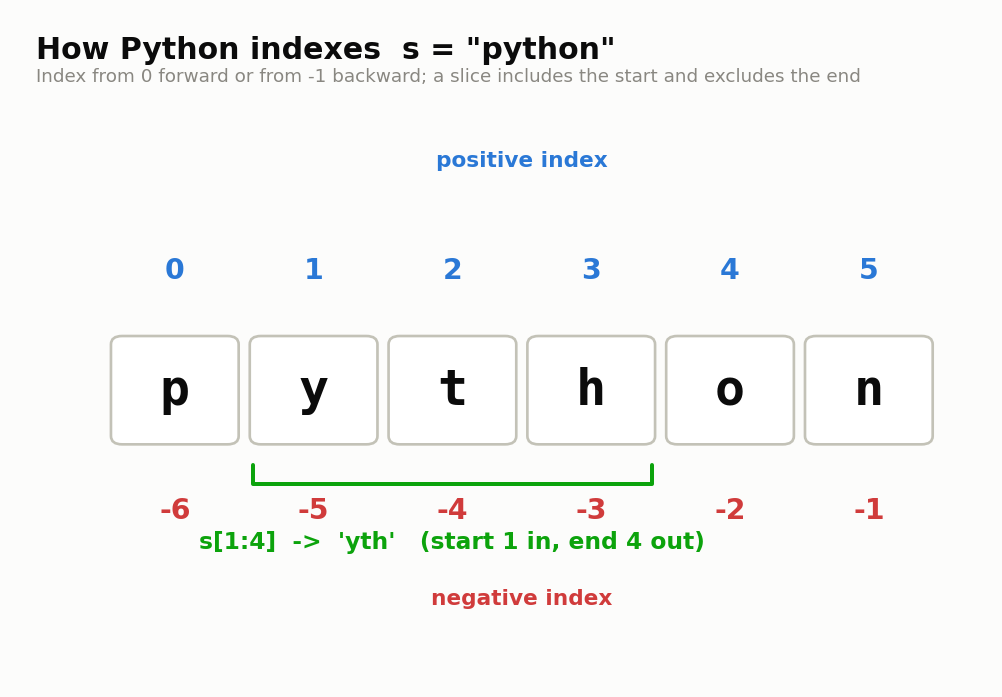
A few slice patterns you'll reuse constantly:
s[:n]grabs the firstncharacters.s[n:]grabs everything fromnonward.s[::-1]reverses the whole string.s[::2]takes every second character.
Here's the one almost no tutorial mentions: the whole-string slice s[:] doesn't copy a string, it returns the same object. Because strings are immutable, CPython sees no reason to duplicate one, so s is s[:] comes back True. That's the opposite of lists, where lst[:] gives you a fresh copy, and it only bites you when you assume a slice is always a defensive copy.
Formatting strings: f-strings, .format(), and %
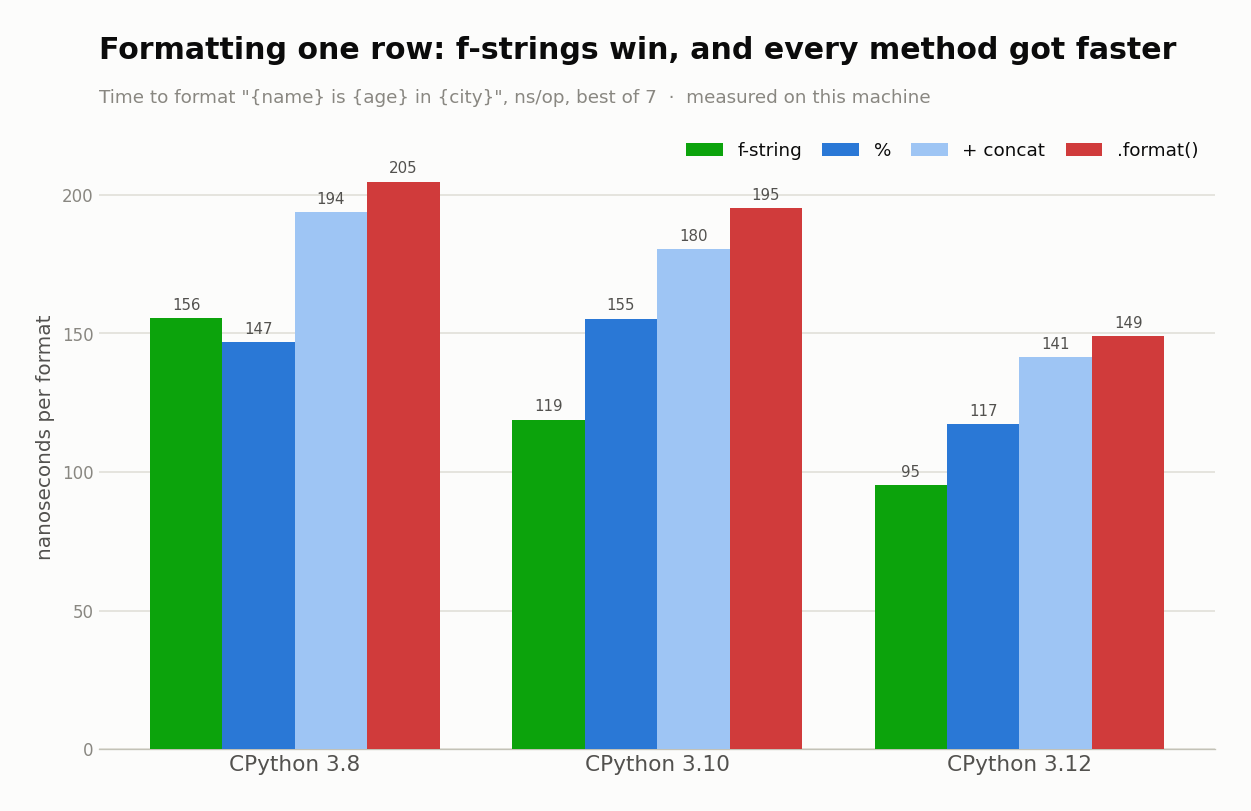
Python gives you three formatters: f-strings, str.format(), and the old % operator. Use f-strings by default. They read cleanly and, measured here, run fastest of the three across every version. Reach for .format() when the template lives apart from the data, and keep % for the rare case it fits (still not obsolete, just limited).
One correction first, because a few guides get it wrong: .format() didn't arrive in Python 3. It shipped back in 2.6 and 2.7. f-strings are the 3.6 addition.
Every beginner page says f-strings are "faster" without a single number behind it. So here's the number. This times formatting one row, in nanoseconds per operation, best of 7:
| Formatter | 3.8 | 3.10 | 3.12 |
|---|---|---|---|
| f-string | 155.5 | 118.9 | 95.3 |
% | 146.9 | 155.3 | 117.3 |
+ concat | 193.7 | 180.3 | 141.3 |
.format() | 204.7 | 195.2 | 148.9 |
The f-string wins on 3.10 and 3.12, and .format() is the slowest formatter in all three versions. On 3.8 the picture is muddier, % edges ahead there, which is exactly why a ranking with no version attached is worth so little.
name, n = "Ada", 42
f"{name}: {n}"            # fastest, reads inline
"{}: {}".format(name, n)  # template lives apart from data
"%s: %d" % (name, n)      # old, still fine, less flexible
None of this matters for a handful of strings. It starts to matter in a hot loop, and it matters most that you don't quote a "fastest" without saying which Python you ran it on.
Building a big string efficiently
The usual advice is "never use +=, always join." Measured across three versions, clean += is actually linear and often beats list.append plus "".join. And io.StringIO, sold everywhere as the fast option, was the slowest real method every single time. Join is still the safest default, for a reason the next section explains.
Here's the whole loop timed, in milliseconds, building a 100,000-piece string, best of 7:
| Method | 3.8 | 3.10 | 3.12 |
|---|---|---|---|
s += piece (clean) | 4.914 | 3.125 | 2.273 |
list.append + "".join | 6.043 | 3.558 | 2.179 |
"".join(genexpr) | 4.708 | 2.914 | 2.916 |
io.StringIO | 6.166 | 4.506 | 2.409 |
bytearray += then decode | 4.650 | 3.267 | 2.350 |
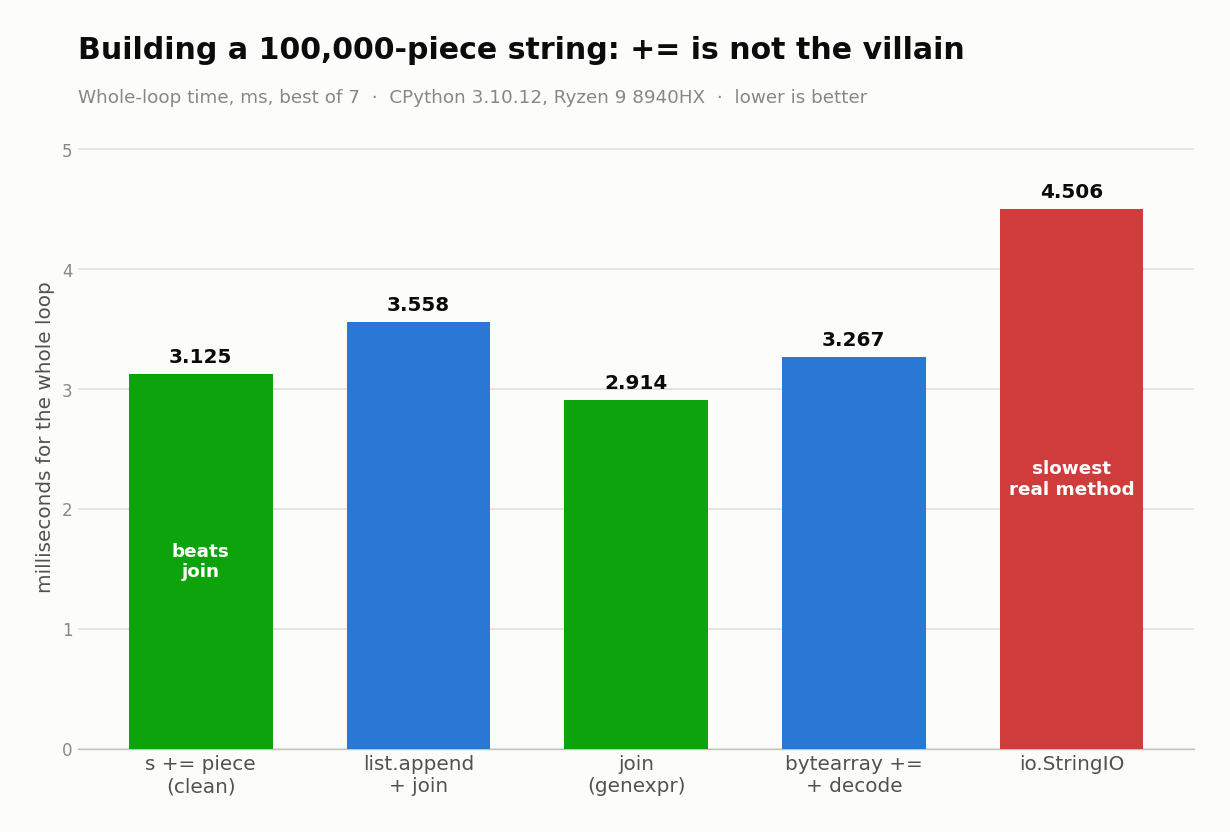
Read the 3.8 and 3.10 columns. Clean += beats the list-plus-join pattern that half the internet calls mandatory. StringIO is the slowest real build method on every version (6.166 ms on 3.8), not the speed trick it's usually sold as. On 3.12 the gap between the top methods basically vanishes, which is its own lesson about pinning advice to one release.
How these numbers were measured. AMD Ryzen 9 8940HX, Linux 6.17 x86_64, CPython 3.8.20 / 3.10.12 / 3.12.3. Timing via
time.perf_counter, best of 7 trials, garbage collection disabled, and every input built at runtime so the compiler can't constant-fold the answer. Every timing in this article is machine-run, not hand-timed or remembered. A benchmark script ran each case in a tight loop and kept the best of 7 trials on the hardware above, then a second script re-ran the+=cases to confirm the O(n²) result. Nothing here is a recollection of "this felt fast," the numbers come straight out of those scripts, and you can re-run them yourself to check.
So why does anyone still say "always join"? Because clean += has a cliff, and join doesn't.
The refcount-1 rule: when += actually goes quadratic
CPython optimizes s += piece in place, but only while s has exactly one reference. Keep an alias to each intermediate string and the identical loop falls off a cliff into O(n²). The real rule isn't "always join," it's keep your accumulator unaliased. Join is safe because it sidesteps the trap entirely.
The optimization lives in the bytecode evaluator. When s has a refcount of 1, CPython knows nobody else can see it, so it resizes the string in place instead of allocating a fresh copy each time. Add one alias and that guarantee is gone, so every iteration copies the whole accumulated string. That's the O(n²) you were warned about.
# Fast path: s has exactly one reference, resized in place.
s = ""
for piece in pieces:
    s += piece                 # 40,000 iters = 1.01 ms

# Slow path: keep a second reference to each intermediate.
s = ""
history = []
for piece in pieces:
    s += piece
    history.append(s)          # s now has refcount 2 every loop
                               # same 40,000 iters = 2570 ms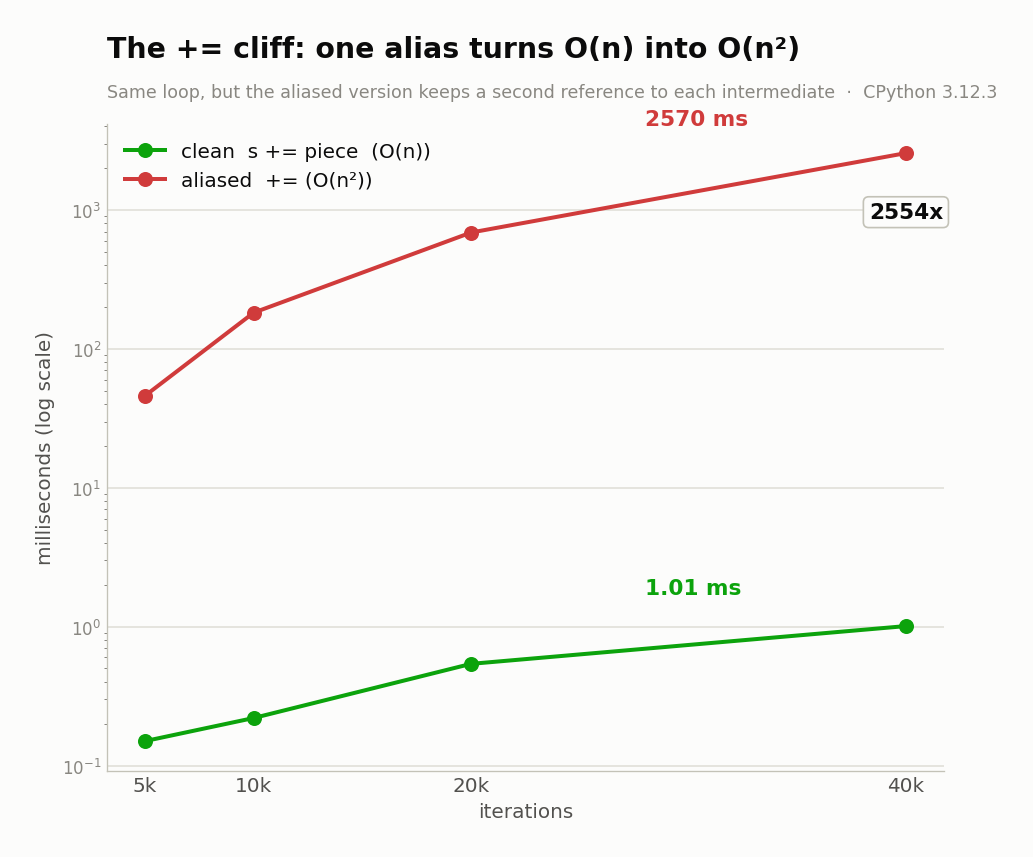
That single history.append(s) is the whole difference: 1.01 ms versus 2570 ms, a 2554x blowup on 3.12. And it's genuinely O(n²), the ratio grows with n (1906x at n=40k on 3.10, worse as the string gets longer). This is also why "".join(parts) is the bulletproof default. It never holds a growing aliased accumulator, so it can't hit the trap, and it behaves the same on PyPy and Jython where the CPython in-place trick doesn't exist.
How much memory do Python strings use? (the widest-character tax)
A Python string pays memory for its widest code point, not its average one. Under PEP 393, a pure-ASCII string uses 1 byte per character, but one astral emoji forces the whole string up to 4 bytes per character. So a 1000-character ASCII string measures 1049 bytes. Swap in a single emoji and it balloons to 4076.
Call it the widest-character tax. PEP 393's flexible representation picks one storage width for the entire string based on its largest code point, then every character pays that rate:
| Widest code point in the string | Bytes per char |
|---|---|
| ASCII (U+0000..U+007F) | 1 |
| Latin-1 (U+0080..U+00FF) | 1 |
| BMP (up to U+FFFF) | 2 |
| Astral (above U+FFFF, e.g. emoji) | 4 |
import sys
sys.getsizeof("a" * 1000)          # 1049 bytes  (all ASCII)
sys.getsizeof("a" * 999 + "🔥")     # 4076 bytes  (one astral char)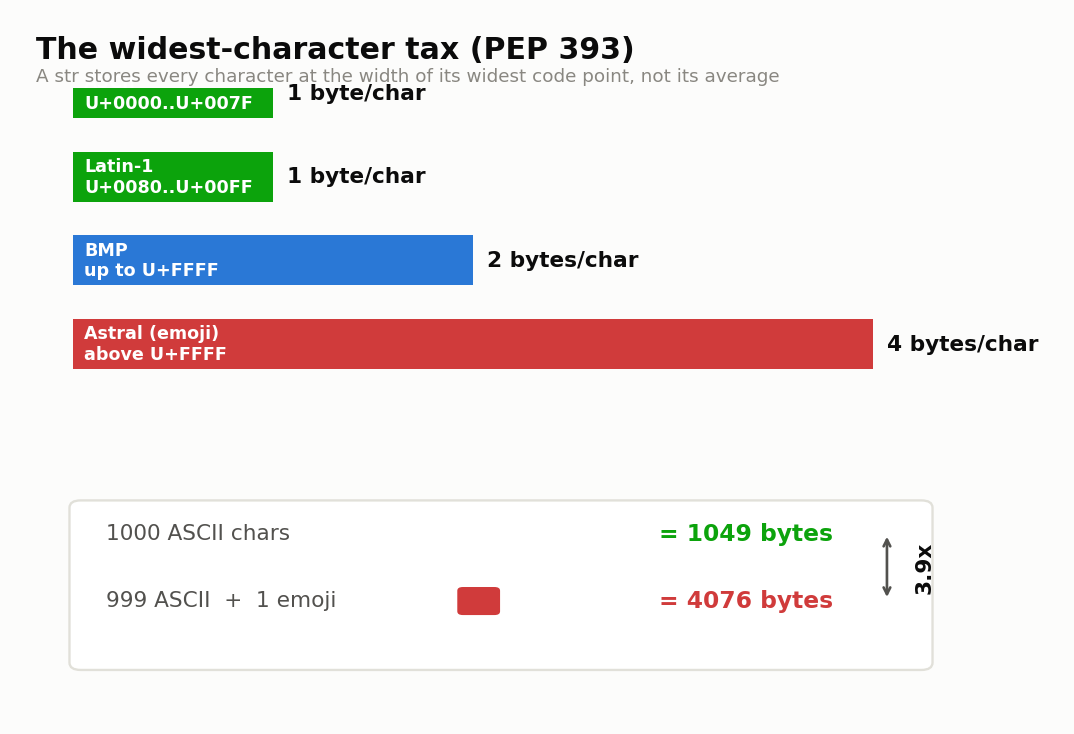
That's a 3.9x jump in storage from a single character. It matters when you're holding millions of strings, a log line with one stray emoji quadruples, and it's invisible until you profile memory. For the record, the bare-object overhead did shrink between versions, from 49 bytes on 3.10 down to 41 on 3.12, so even the fixed cost moves under you.
Why len() disagrees with what you see
len() counts Unicode code points, not the characters you see or the bytes on disk. So "café" written with a combining accent measures 5, not 4, and the family emoji 👨👩👧 comes back as 5 while taking 18 UTF-8 bytes. If you need the byte count, encode first: s.encode("utf-8") gives you the bytes.
len("café") # 5 if the é is e + a combining accent (U+0301)
len("👨👩👧") # 5 code points (three people + two joiners)
len("👨👩👧".encode("utf-8")) # 18 bytesThe thing you see on screen is a grapheme cluster, which can be several code points glued together. len() counts the code points underneath. Those are three different numbers for the same visible text:
| What you're counting | "café" (combining) | family emoji |
|---|---|---|
| Grapheme clusters (visible) | 4 | 1 |
Code points (len) | 5 | 5 |
UTF-8 bytes (.encode) | 6 | 18 |
The bridge between the two worlds is .encode() and .decode(). A str is code points; bytes is raw storage, and .encode("utf-8") turns one into the other. Worth being precise here, since a couple of guides get it wrong: bytes is not a "string type." It's a separate type that holds binary data, and mixing the two without encoding is where TypeError shows up.
== vs is: never compare strings with is
Compare string values with ==, never is. The is operator asks whether two names point to the same object, and CPython's interning of strings is version-dependent. chr(97) is "a" returns True on 3.8 and 3.10 but False on 3.12, a real caching change. Computed strings like str(255) are never interned at all.
chr(97) is "a"      # True on 3.8.20 and 3.10.12, False on 3.12.3
chr(97) == "a"      # True on every version, always
str(255) is "255"   # False on all three (computed, not interned)
str(255) == "255"   # True everywhere
Here's the behavior laid out:
| Comparison | 3.8.20 | 3.10.12 | 3.12.3 |
|---|---|---|---|
chr(97) is "a" | True | True | False |
str(255) is "255" | False | False | False |
chr(97) == "a" | True | True | True |
Interning is a CPython memory optimization where identical short strings can share one object, and the rules for which strings qualify change between releases. That's fine for the optimization, it's just not something you can build logic on. If your equality check ever depends on is, it'll pass in one Python and silently fail in the next. Use == for value, keep is for None.
String methods you'll actually use (and the near-duplicates)
The methods you reach for daily are .upper(), .lower(), .strip(), .replace(), .split(), .join(), and .find(). They all return new strings and never mutate the original. Where they get confusing is the near-duplicates: .find() returns -1 while .index() raises, and .isdigit(), .isdecimal(), and .isnumeric() disagree on fractions and superscripts.
Since a string can't change in place, every one of these hands you a new string and leaves the original alone. The traps are the pairs that look identical until they aren't:
| Method | Returns / behavior | When to use |
|---|---|---|
.find(x) | first index, or -1 if absent | when "not found" is normal, no exception |
.index(x) | first index, or raises ValueError | when absence is a bug you want caught |
.isdigit() | True on "²" and "½" too | rarely what you want |
.isdecimal() | True only on plain 0-9 | validating actual decimal digits |
.isnumeric() | True on fractions, Roman numerals | broadest numeric check |
.removeprefix(p) | strips p if present (Python 3.9+) | trimming a known prefix cleanly |
One more measured detail, since prefix checks are everywhere. For a single-character prefix test, indexing is faster than the method call: s[0] == "/" clocked 33.5 ns against s.startswith("/") at 55.3 ns on 3.12, about 1.65x. But flip it around for multiple prefixes and startswith wins, the tuple form s.startswith(("http", "/", "ftp")) ran 58.8 ns versus 89.1 ns for an or-chain of three separate checks. So s[0] == for one character, startswith((...)) for several.
What changed across Python versions (and why speed advice rots)
String behavior and speed both drift between versions, so any ranking without a version stamp is suspect. f-strings arrived in 3.6, removeprefix/removesuffix in 3.9, and substring search got about 3.5x faster in 3.11/3.12. That same jump means "fastest method" advice pinned to one version quietly goes stale on the next.
The substring number is the sharp one. "NEEDLE" in hay on a 1000-character haystack held steady around 293 ns on 3.8 and 296 ns on 3.10, then dropped to 84.9 ns on 3.12. That's the specializing interpreter plus a faster find landing in 3.11/3.12, and str.find picked up the same 3.5x.
| Feature / operation | 3.8 | 3.10 | 3.12 |
|---|---|---|---|
| f-strings | yes (since 3.6) | yes | yes |
removeprefix/removesuffix | no | yes (3.9+) | yes |
"NEEDLE" in hay (ns) | 293.2 | 296.3 | 84.9 |
So here's the opinion, and it's argued straight from those numbers: micro-benchmark speed rankings don't belong in a beginner tutorial without a version stamp. A 3.5x shift in two releases means "use X, it's fastest" is a half-life claim, not a fact. Teach why a method is safe (join sidesteps the refcount trap, == sidesteps interning) over which one won a benchmark on someone's laptop two Pythons ago.
FAQ
How do I reverse a string?
Use a slice with a step of -1: s[::-1]. That reads the string back to front and hands you a brand-new string, since the original can't be changed in place. There's no built-in reverse() for strings the way lists have one, so the slice is the idiomatic move.
How do I check if a substring is present?
Use the in operator: "x" in s returns True or False. It's the fastest check you've got, and on a 1000-character haystack it ran about 3.5x faster in 3.11/3.12 (293 ns down to 84.9 ns here). If you want the position instead of a yes-or-no, reach for .find() or .index().
Is the string module the same as str?
No, they're two different things. The string module is a small standard-library helper holding constants like string.ascii_lowercase plus a Template class for old-style substitution. The built-in str is the actual text type you use every day. Most code never imports the module at all, so don't let the shared name confuse you.
How do I delete a character from a string?
You can't, because strings are immutable and nothing edits one in place. Build a new string instead: s.replace("x", "") drops every x, or a slice like s[:i] + s[i+1:] cuts out the character at index i. And del s just removes the name s, it doesn't touch a character inside.
What's the difference between str() and repr()?
str(x) gives you the readable form meant for users, while repr(x) gives the unambiguous form meant for developers, usually wrapping a string in quotes. For the string "hi", str prints hi but repr prints 'hi'. When you echo a value at the interactive prompt, what you see is its repr.