
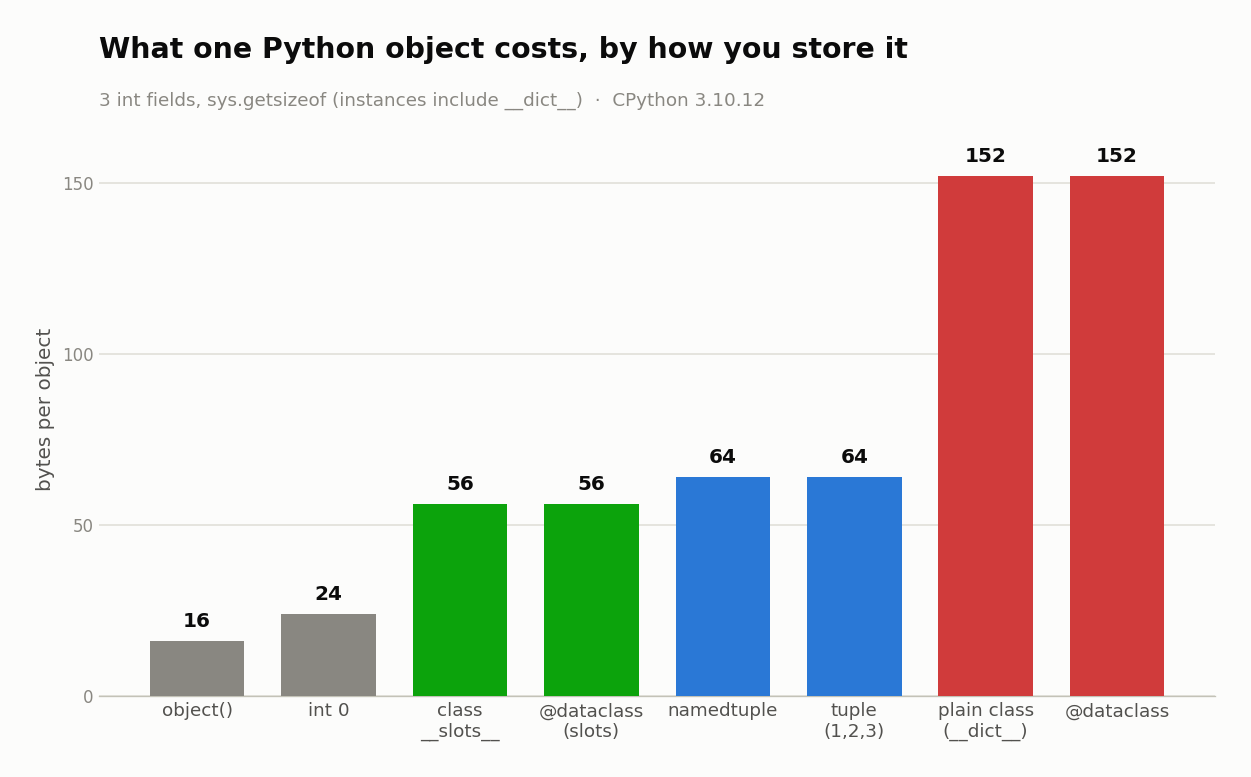
An object in Python is a bundle of data and behavior that carries three things: an identity, a type, and a value. Almost every value is one, even int 0, which weighs 24 bytes on the heap. How you store objects (plain class, __slots__, dataclass, tuple) swings memory 8 ways, from 56 to 282 bytes each.
Key takeaways
- Everything is an object with a header tax: a bare
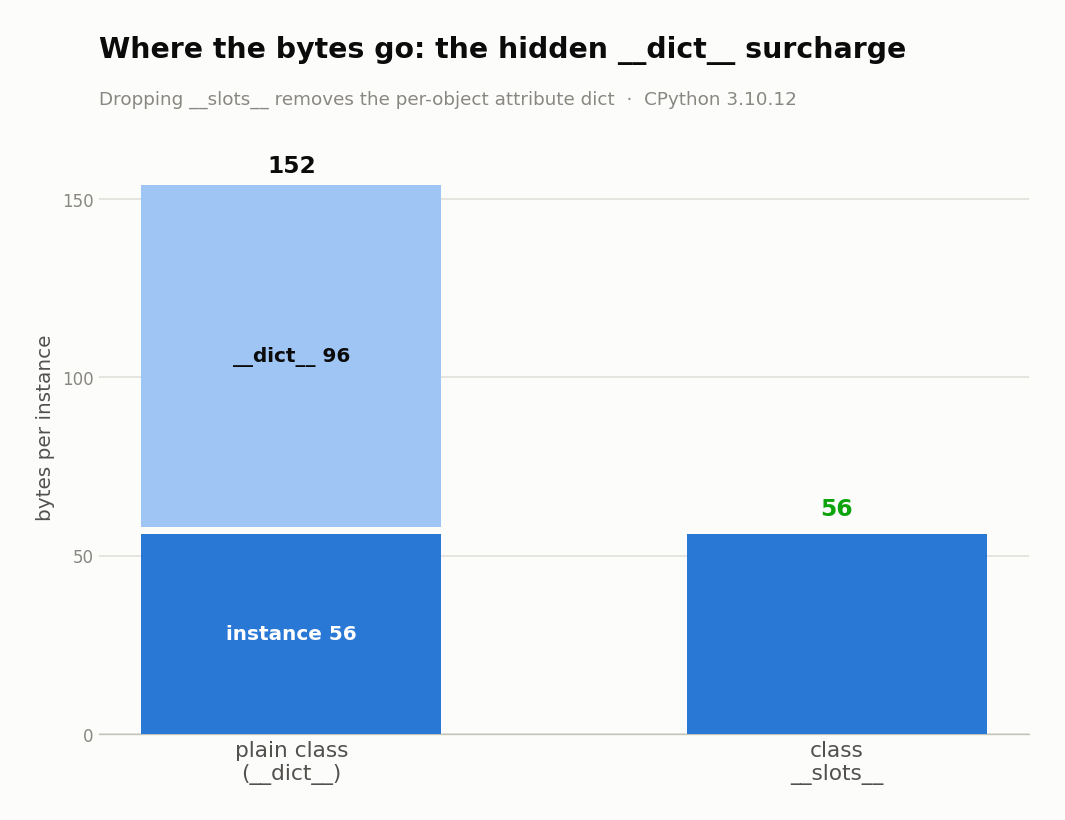
object()is 16 bytes,int 0is 24 bytes, andint 10**100is 72 bytes. __slots__cut resident memory 47.9% (191.7 MB down to 99.8 MB) for 1,000,000 three-int instances on CPython 3.10.12.- A plain instance is 152 bytes (56 for the instance plus 96 for its hidden
__dict__); the slotted version is 56 bytes. - Reading through a trivial
@propertycost 69.2 ns versus 31.6 ns for a slot, roughly 2x for zero benefit until you actually need validation. - CPython caches small ints in the range [-5, 256], so
256 is 256is True but257 is 257is False.
What is an object in Python?
An object in Python is a self-contained bundle of data (its attributes) and behavior (its methods). Every object carries an identity, a type, and a value. It lives on the heap, so even a bare object() takes 16 bytes of pure header before you store a single field.
That last part surprises most people, who think of a class as free and an object as cheap without realizing there's a floor. Every value you create sits in memory with a small block of bookkeeping attached, and you pay for that block whether the object holds three fields or none.
A class is the template you stamp objects from, so imagine you write a Dog class. The class describes what a dog is (it has a name, it can bark), and each dog you make from it is an instance, a separate object with its own name. The class is the cookie cutter, the objects are the cookies.
So when people say Python is object-oriented, this is what they mean in practice: you group related data and the functions that work on it into one thing, then make as many of that thing as you need.
How do you build a class and create an object?
You define a class with class Dog: and give it an __init__ method that sets up each instance's attributes, where self is that instance, handed to the method automatically. Calling Dog() runs __init__ and hands back a new object. Reach into it with dot notation, like d.name.
Here's the whole loop:
class Dog:
    def __init__(self, name):
        self.name = name        # attribute on this instance

    def bark(self):
        return f"{self.name} says woof"

d = Dog("Rex")
print(d.name)     # Rex
print(d.bark())   # Rex says woof
A few things are worth pinning down here. __init__ is the constructor, which Python calls for you the moment you write Dog("Rex"), and self isn't magic, it's just the first parameter that receives the new instance. If you want an empty class body while you sketch, pass is the placeholder.
The class itself costs nothing until you instantiate it, because it's the objects that carry weight. Each Dog() you build is an independent object, and a plain instance like this one measures 152 bytes once you count its hidden attribute storage. Make a million of them and that number starts to matter, which is where the rest of this article goes.
What are an object's identity, type, and value?
Every object has three fixed facts: id() returns its identity (in CPython, the memory address), and type() returns its type, itself an object. Its value is the concrete data it holds, the contents two separate objects can share. is compares identity, == compares value, and two different objects can hold the same value.
Watch the difference in one shot:
a = [1, 2]
b = [1, 2]
print(a == b)         # True   same value
print(a is b)         # False  two different objects
print(id(a), id(b))   # two different addresses
print(type(a))        # <class 'list'>

import sys
print(sys.getsizeof(0))   # 24   the int you typed is a heap object
a and b look identical and they are, by value, but they're two separate objects at two addresses, so is says False. This trips up beginners constantly, and it's the root of the 256 is 257 puzzle in the next section.
Identity also explains cleanup, since each object is tracked by how many names point at it. Drop the last reference with del (or let it go out of scope) and CPython's reference counting frees the object right away. The identity is real, it's just not something you usually look at.
Why does is sometimes lie? (256 vs 257)
Because CPython pre-builds one shared object for every small int in the range [-5, 256] and reuses it everywhere. Inside that range is returns True by coincidence. Outside it, every int is a distinct object, so 256 is 256 is True but 257 is 257 is False. Use == whenever you actually mean value rather than identity.
a = 256
b = 256
print(a is b)   # True   both names point at the one cached int

a = 257
b = 257
print(a is b)   # False  two separate int objects
The boundary is real and you can find it yourself. Force Python to build brand-new ints (something like int(str(n)) is int(str(n))) and walk n upward: identity holds through 256 and breaks at 257. That's not a rule you have to memorize, it's just where CPython stops keeping a cached copy on hand.
The takeaway is simple: is asks whether two names point at the exact same object, not whether they are equal. For numbers, strings, and anything where you care about value, reach for ==, and save is for None and other true singletons.
Is a plain number really an object?
A plain number is a full object you can weigh. The interpreter proves it three ways: sys.getsizeof(0) returns 24 bytes, type(5) is int, and (5).bit_length() calls a real method. There is no just-a-number in Python: int 0 is a 24-byte heap object and int 10**100 grows to 72 bytes. Functions, classes, and modules count as objects too.
import sys
print(sys.getsizeof(0))        # 24
print(sys.getsizeof(10**100))  # 72   bigger number, bigger object
print(type(5))                 # <class 'int'>
print((5).bit_length())        # 3    a method call on a literal
The size grows with the number because Python ints have no fixed width. A tiny int and a hundred-digit int are the same kind of object, one just carrying considerably more digits. Either way you're holding a heap object with a header, not a raw machine integer.
This is what "everything is an object" really means. A function has settable attributes, a class is a value you pass around, and the int 5 carries genuine methods. It's a remarkably consistent model, and the next few sections cover what that model costs you in bytes.
Where do an object's attributes actually live? (__dict__)
On a normal instance, an object's attributes live in a per-object dictionary called __dict__. That's why a plain instance costs 152 bytes: 56 for the instance plus 96 for that dict. Adding __slots__ removes the dictionary and drops the same object to 56 bytes. Here's every common way to hold three int fields, weighed.
| representation | bytes | notes |
|---|---|---|
bare object() | 16 | pure header, no attributes |
int 0 | 24 | the literal you type is a heap object |
class with __dict__ | 152 | instance 56 + its dict 96 |
class with __slots__ | 56 | no per-instance dict |
@dataclass | 152 | same as a plain class |
@dataclass(slots=True) | 56 | same as slots |
namedtuple | 64 | tuple-backed |
plain tuple (1, 2, 3) | 64 |
Measured on CPython 3.10.12 with sys.getsizeof (instance sizes include the __dict__). The pattern is clear: the flexible option (a normal class with a per-object dict) is nearly 3x the size of the compact ones. That flexibility is the ability to bolt on arbitrary attributes at runtime, which is handy in a script and wasteful in a data class you'll make a million of.
How much memory do Python objects actually use?
At scale, the per-object memory gaps between Python objects compound. Building 1,000,000 three-int objects, a plain class held 191.7 MB of resident memory, while __slots__ and a plain tuple held 99.8 MB each, and storing the same data as dicts cost 269.7 MB. __slots__ cut resident memory 47.9% versus the plain class.
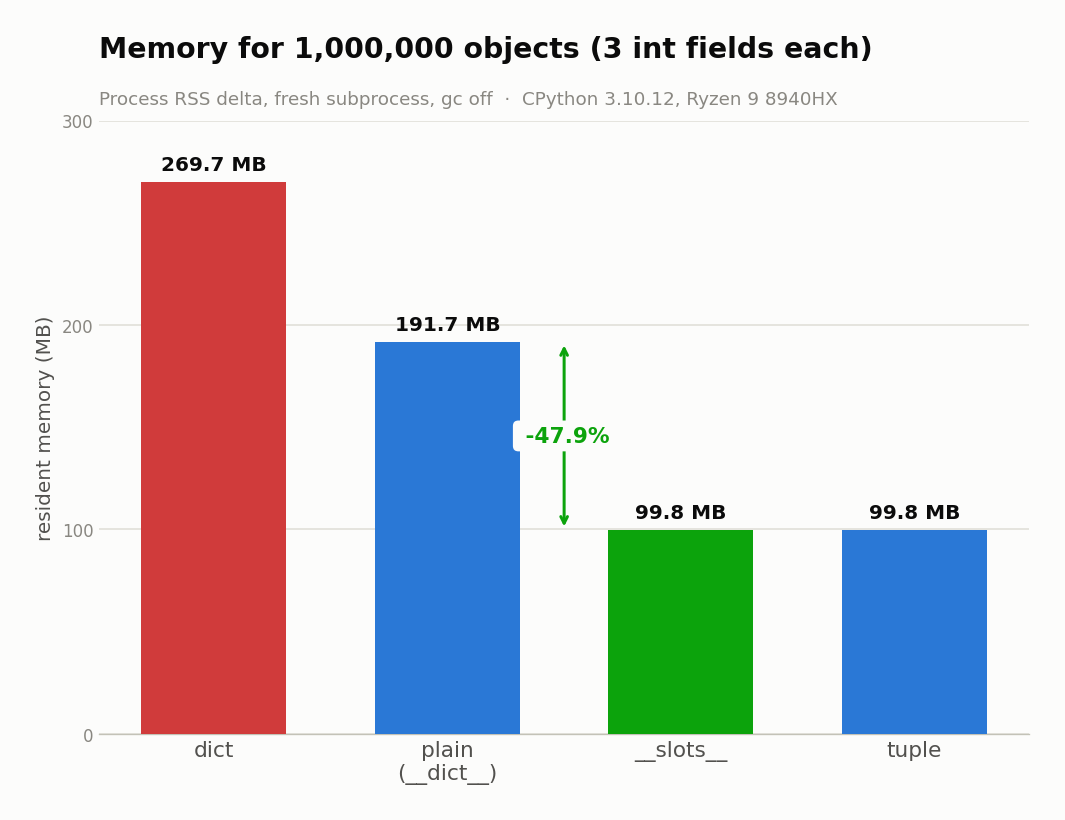
| variant | RSS (1M objects) | bytes/obj |
|---|---|---|
plain (__dict__) | 191.7 MB | 201 |
__slots__ | 99.8 MB | 104 |
| tuple | 99.8 MB | 104 |
| dict | 269.7 MB | 282 |
Those are process RSS deltas, each variant built in a fresh subprocess with garbage collection disabled, on CPython 3.10.12. The bytes-per-object here run higher than the sys.getsizeof numbers above because RSS also counts allocator overhead and the container holding all million references. That's the honest, real-world figure.
The lesson isn't "never use a plain class." It's that the default you were taught, a class with an __init__, is the heaviest common option, and the cheaper ones are one keyword away. If you're holding a lot of records in memory, that 47.9% is free.
Are objects slow to reach into? (attribute-access speed)
Reaching into an object's field is cheap; wrapping that field in a @property is not. Over a 31.0 ns local-variable floor, a __slots__ read cost 31.6 ns, a normal __dict__ instance 34.2 ns, a dict[key] 37.5 ns, and a trivial @property 69.2 ns. That property is roughly double, because it runs a real function call, not a field read.
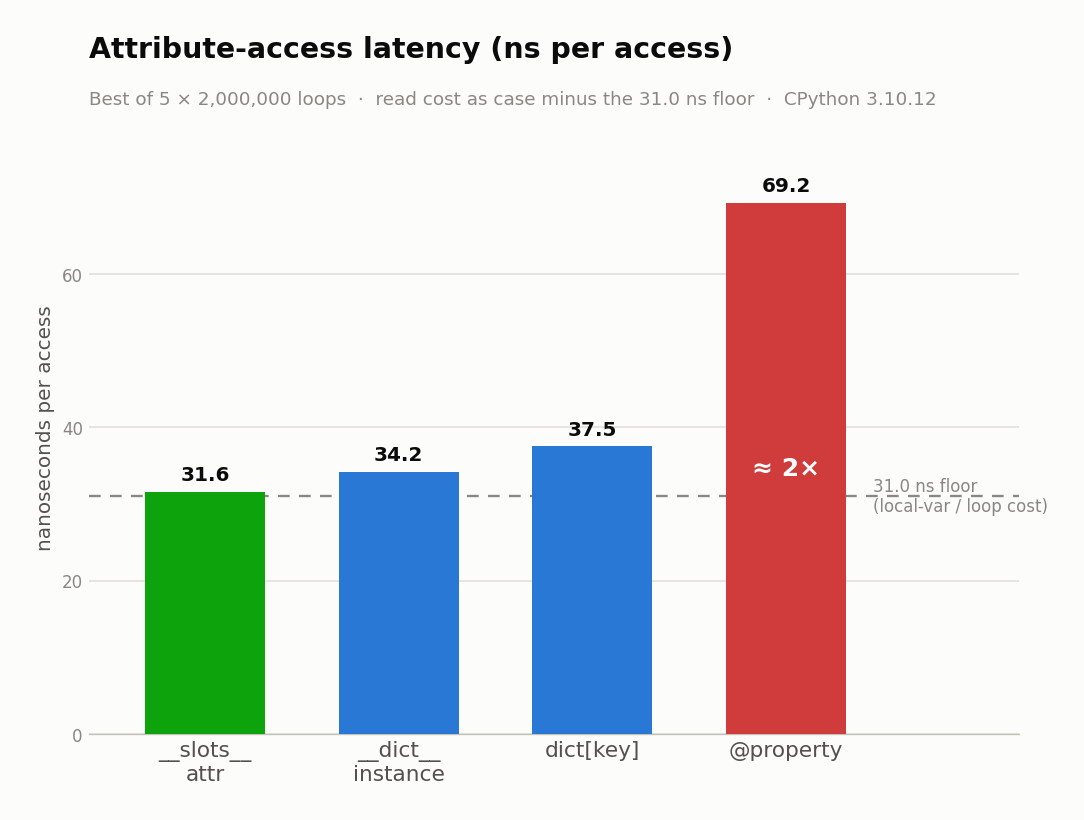
| access pattern | ns/op | over the 31.0 ns floor |
|---|---|---|
__slots__ attribute | 31.6 | ~0.6 |
__dict__ instance attribute | 34.2 | ~3.2 |
dict[key] | 37.5 | ~6.4 |
@property | 69.2 | ~38 (about 2x) |
Best of 5 runs, 2 million loops each, same machine. Read the numbers as "cost above the floor," since even touching a local variable takes about 31 ns to measure.
The practical read: slot access and dict access are all within a few nanoseconds of each other, so don't lose sleep choosing between them for speed. The one that stands out is @property. It looks like a plain attribute but is really a disguised method call, so a getter that just returns self._x doubles your access cost. Worth it when you need validation, wasteful when you added it out of habit.
Should you reach for __slots__ by default?
For any class that mostly holds data and will exist in quantity, yes. __slots__ (or @dataclass(slots=True)) buys about 48% less memory and marginally faster reads. The only thing you give up is arbitrary dynamic attributes you rarely wanted, so treat the three costs as one bill.
Call it the Object Tax. "Everything is an object" is a nice line, but it's also an invoice with three line items:
- The header tax. A fixed ~16-byte header on every single value, paid whether or not it holds any fields.
- The
__dict__surcharge. About 96 extra bytes per instance for the per-object attribute dictionary, the biggest single chunk. - The lookup tax. Attribute resolution costs a little more than reading a raw field, and a
@propertywrapper roughly doubles it.
__slots__ is the one lever that pays down the surcharge and shrinks your working set, and it barely touches the lookup tax. Most tutorials treat it as an obscure optimization you learn late. The measured reality argues the opposite: for the everyday "bag of fields" class, it should be your default, and the plain __dict__ class is the thing you reach for only when you genuinely need to attach attributes on the fly.
What's the mutable-default-argument bug?
A default like def add(x, bucket=[]) binds that list once, at definition time. So every call without a bucket shares the same object, and values leak across calls: ['a'], then ['a', 'b'], then ['a', 'b', 'c']. The fix is a None sentinel and a fresh list inside the function.
def bad_append(x, bucket=[]):     # the list is created ONCE
    bucket.append(x)
    return bucket

print(bad_append('a'))   # ['a']
print(bad_append('b'))   # ['a', 'b']   leaked!
print(bad_append('c'))   # ['a', 'b', 'c']

def good_append(x, bucket=None):
    if bucket is None:
        bucket = []               # fresh list every call
    bucket.append(x)
    return bucket
The proof is in the identity: id(bad_append.__defaults__[0]) returns the same address on every call, because there's only ever one default list. The None version stays isolated, each call gets its own.
This is the same trap in a different coat as a shared class variable. A list defined at class level is one object shared by every instance, so appending through one instance shows up in all of them. When in doubt, ask "how many objects is this really," which is the thread running through this whole article.
list vs tuple vs set vs dict: which should you use?
A list, tuple, set, and dict each store objects differently; pick by what the data does, not habit. Use a list for an ordered, growing sequence and a tuple for a fixed record. A set handles membership tests, and a dict handles keyed lookup, though a dict of fields costs the most at 282 bytes per object.
| you need | use | why |
|---|---|---|
| ordered, growing sequence | list | cheap append, mutable |
| fixed record, never changes | tuple / namedtuple | 64 bytes, immutable, hashable |
| "is X in here?" tests | set | near-instant membership |
| keyed lookup by name | dict | fast by key, but 282 B/obj at scale |
| a class-like data holder in bulk | @dataclass(slots=True) | 56 bytes, named fields |
A dict is the reflexive choice for "a record with named fields," and it's the most expensive one. If those fields are fixed, a namedtuple gives you names and immutability at 64 bytes, and a slotted dataclass gives you names and methods at 56. Reserve the dict for when keys are genuinely dynamic.
One nice guarantee to lean on: dicts preserve insertion order, and that's been part of the language since Python 3.7 (it was a CPython implementation detail in 3.6). So a dict is a fine ordered record too, you just pay for it in bytes. For method-by-method APIs on each type, link out to the reference rather than memorizing them.
FAQ
Is 5 an object?
Yes. type(5) is int, (5).bit_length() invokes a genuine method, and sys.getsizeof(0) returns 24 bytes. Every value in Python is a heap-allocated object with a header, including numbers, strings, functions, and classes. There is no lightweight primitive hiding underneath the friendly syntax.
Why does 256 is 256 work but 257 is 257 fail?
CPython pre-builds and reuses one shared object for every small int in the range [-5, 256]. Inside that range is finds the same cached object and returns True. Outside it, each int is fresh, so 257 is 257 is False. Use == to compare values.
Where are an instance's attributes stored?
On a normal instance, attributes live in a per-object dictionary called __dict__. That dict is why a plain instance costs 152 bytes (56 for the instance, 96 for the dict). Adding __slots__ removes the dict and drops the object to 56 bytes.
Is __slots__ worth it?
For a class that mainly holds data and exists in quantity, yes. A benchmark measured about 48% less memory (191.7 MB down to 99.8 MB for a million instances) and slightly faster attribute reads. You only lose the ability to set arbitrary attributes at runtime, which most data classes never needed.
How these numbers were made: every size and timing above came from a re-runnable benchmark script on CPython 3.10.12, an AMD Ryzen 9 8940HX, Linux 6.17, run 2026-07-09. Nothing here is anecdote, and you can reproduce it by running the script yourself.