
A Python variable isn't a box that holds a value. It's a name stuck to an object. That one idea is what trips up most beginners, and it's also what explains the weird stuff later: aliasing, is, why two variables can share a list. The rest is measured below, so you don't have to guess.
Key takeaways
- A Python variable is a name, not a box. It stores an 8-byte pointer to an object, and the object holds the actual data.
b = acopies nothing. On a 1,000,000-item list,b = aclocked in at 6.1 ns versus 2,811 µs for a real copy (b = a[:]). That's about 458,000 times slower.- Read speed by scope (ns/read): closure 1.82, local 2.38, global 3.14, built-in 3.42. Making a global into a local saves ~0.8 ns (~30%), not orders of magnitude.
x is ylies inside the small-int cache:256 is 256is True, but257 is 257is False for freshly built ints (the cache runs[-5, 256]). Use==for values.- Naming rules: start with a letter or underscore, use only letters, digits, and
_, don't use a keyword, and PEP 8 wants snake_case.
How this was made. Every number here came from a small benchmark script,
bench.py, run once on 2026-07-08 on CPython 3.10.12 (AMD Ryzen 9 8940HX, 64-bit). The raw output is inbench-results.txt. A machine measured these, not my memory:timeit, best-of-7 over 1,000,000 iterations, GC off, opcodes checked withdis.
What is a Python variable?
A Python variable is a name bound to an object, not a box that holds a value. You make one by assignment, like name = value. There's no type to declare, because the type lives on the object, not on the name. Get that one idea and most of the surprises ahead stop being surprising.
Most beginner tutorials call a variable "a container that stores a value." The more careful ones say that picture is wrong. They can't both be right, and it actually matters. It decides what b = a does, whether x is y tells you the truth, and why a list can change under you.
You can prove the name model in three lines. Say x = 257, then y = x, then check id(x) == id(y). It comes back True, because y got the same object reference x already had, not a copy. That reference is one 8-byte pointer, but the object it points at can be huge. A million-integer list measures 8,000,056 bytes, sitting behind an 8-byte name.
Python is dynamically typed, and this is why. When you write count = 5, the integer 5 carries the type and the name count just points at it. Do count = "five" and now the name points at a string. The name never had a type to change. It just moved.
So keep the word "binding" in mind. A variable ties a name to an object, and you can tie more than one name to the same object. That's the whole game.
Ready to name one?
How do you name a variable in Python?
Start the name with a letter or an underscore, then use letters, digits, or underscores after that. Names are case-sensitive, and you can't use a reserved keyword like class or for. Style-wise, PEP 8 wants snake_case, so age_in_years, not AgeInYears or ageinyears.
The hard rules Python actually enforces are short:
- Start with a letter (
a–z,A–Z) or an underscore (_). - Don't start with a digit.
2fastis aSyntaxError. - After the first character, only letters, digits, and underscores.
- No spaces, dots, or dashes.
- Don't use a keyword like
class,for,is, orlambda. Python reads those as grammar, sofor = 1is aSyntaxError. - Case matters:
age,Age, andAGEare three different variables. - Names can be any length, and Unicode letters (Greek, accented) are allowed.
The style stuff is convention, not enforced. PEP 8, Python's official style guide, says use snake_case for variables and UPPER_CASE for constants, like total_price and MAX_RETRIES. Python won't stop you writing totalPrice, but anyone reading idiomatic Python will hear it as an accent.
There's one trap here, and it reaches further than you'd expect. Names like list and id are built-in functions, not keywords, so Python lets you use them as variable names without a word of warning. Take the 20 most common built-in names (list, dict, set, str, id, sum, len, type, range, and more): all 20 are legal variable names, and none is a keyword, so Python flags exactly zero of them. Shadow one and it breaks. After list = [1, 2], calling list(range(3)) raises TypeError: 'list' object is not callable. It's only broken in that scope, and del list gets the built-in back (bench.py). The name is fine. The bug is the part nobody warns you about.
So the name is legal. But what's it actually holding?
How do you assign, reassign, and convert a variable's type?
You assign with =. Reassigning just points the name at a new object, so a variable can "change type" from int to str whenever you want. You can also do a, b = 1, 2, and swap with a, b = b, a, because the right side builds a tuple first. del drops the name.
Reassigning looks like mutation, but it isn't. Say n = 10, then n = "ten". It feels like the variable changed type. It didn't. The name n just got rebound from the int to the string, and the old 10 sits there untouched until the garbage collector clears it. The name moved. The objects never changed.
That's what makes the assignment shortcuts click:
a = b = c = 0binds three names to the same zero. Checkid(a) == id(b) == id(c)and you get True. One object, three names.a, b, c = 1, 2, 3binds three names to three objects in one line.a, b = b, aswaps two variables with no temp.
The swap works for one reason. Python builds the whole right side first, the tuple (b, a) from the current objects, then unpacks it into the names on the left. Both old values are captured before either name gets reassigned, so it can't clobber itself.
Converting types is explicit, and it's also just rebinding. int("42") builds a new int, str(42) a new string, float("3.14") a float. To see what type a name points at right now, use type(n), or isinstance(n, int) for a safer check. Every cast makes a fresh object and rebinds. It never edits the value in place.
So if names just point at objects, what happens when two names point at the same one?
Names, not boxes: what a Python variable actually holds
A Python variable holds no data. It holds an 8-byte pointer to an object. That's why b = a is basically free. On a million-item list, b = a clocked in at 6.1 ns, versus 2,811 µs for a real copy (b = a[:]). About 458,000 times slower, because b = a copies one pointer and b = a[:] copies every element.
The sizes make the box picture fall apart. On a 64-bit build, sys.getsizeof says that million-integer list is 8,000,056 bytes, while the name pointing at it is 8 bytes. One machine pointer. And it's the same 8 bytes whether the name holds the number 1 or that 8 MB list.
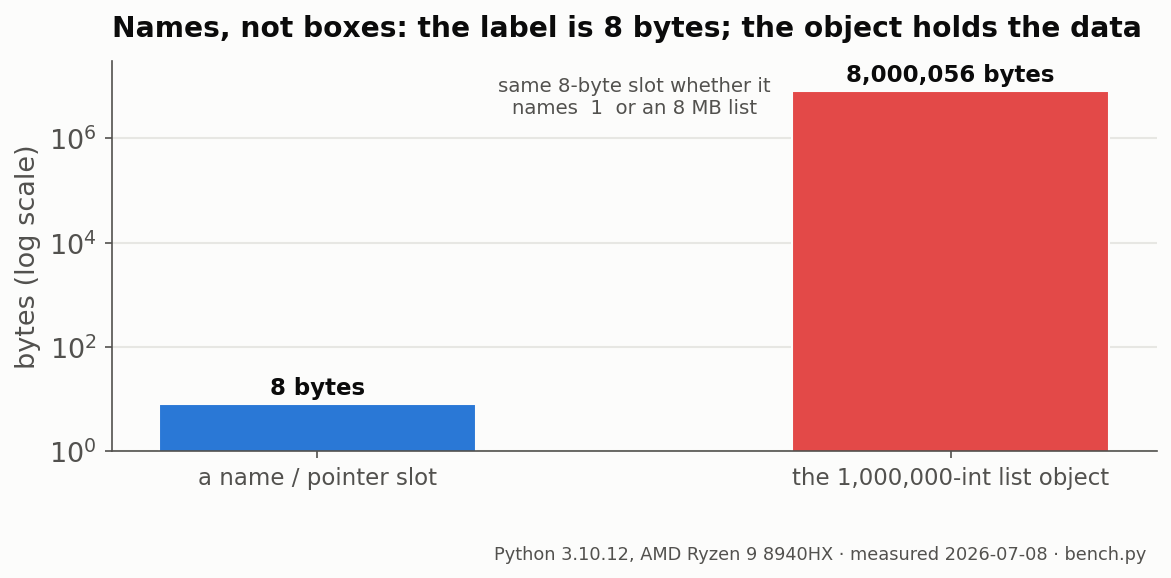
So b = a doesn't walk the list, allocate anything, or copy elements. It writes one pointer, and afterward id(a) == id(b) is True. Both names point at the exact same object. That 6.1 ns is just the cost of copying that pointer, and it stays 6.1 ns whether the list has ten items or ten million.
That 458,000x gap is what the box picture costs you. If you think a variable holds the list, you'll assume b = a makes a copy, then mutate a and wonder why b changed too. There's only one list. When you actually want a copy, ask for one (b = a[:], b = a.copy(), or copy.deepcopy(a)) and pay the 2,811 µs. Plain assignment never does.
Two names on one object has a name: aliasing. And one question predicts every bug it causes.
Local, global, and closure Python variables: the LEGB latency ladder
Python looks names up through four scopes: local, enclosing, global, built-in. That's LEGB, and each one costs a little more to read. Measured out, a local read runs about 2.38 ns, global 3.14, built-in 3.42, and a closure variable 1.82. So where a variable lives does affect read speed, a bit.
Here's the ladder, with the bytecode Python actually runs for each:
| Variable scope | Bytecode | ns / read | vs local |
|---|---|---|---|
Closure / nonlocal | LOAD_DEREF | 1.82 | 0.76× |
| Local | LOAD_FAST | 2.38 | 1.00× |
| Global | LOAD_GLOBAL | 3.14 | 1.32× |
Built-in (e.g. len) | LOAD_GLOBAL → builtins | 3.42 | 1.43× |
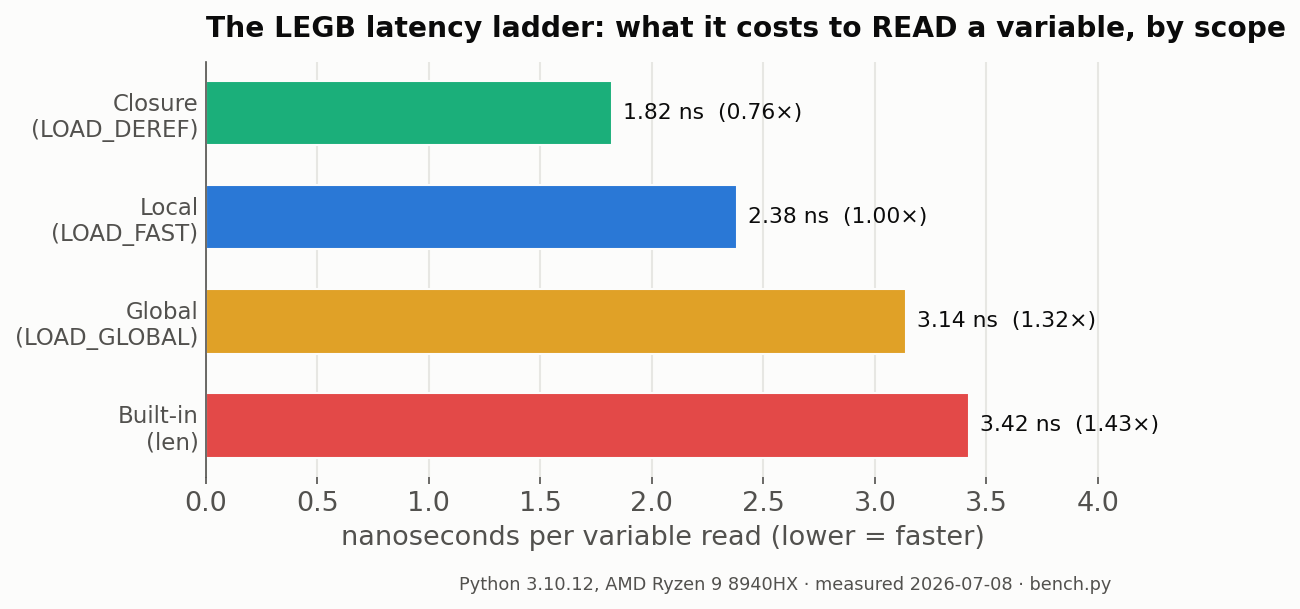
LEGB is just the search order for a bare name. Python checks Local first, then Enclosing, then Global, then the Built-in scope where len and print live. A local read is LOAD_FAST, which indexes a small array. A global is LOAD_GLOBAL, which hashes into the module dict. A built-in misses that dict and falls through to a second lookup, which is why len at 3.42 ns is the slowest name on the ladder.
Does making a variable local actually make it faster?
Kind of, but not by much. Making a global into a local takes you from 3.14 ns to 2.38 ns per read, so about 0.8 ns, roughly 30%. It's real, but nowhere near the big win people imply. It only starts to matter inside a tight loop that runs millions of times.
One note on the method, because it's the actual lesson here. A first version of this benchmark read each name only 20 times per call. At that rate the ~40 ns of call overhead drowned out the ~3 ns signal, and the ordering came out nonsense. Bumping it to 200 reads per call dropped the overhead under 2% and gave the stable ladder above. If a tutorial reports scope costs without controlling for call overhead, don't trust the numbers.
Speed is one thing scope decides. Shared identity is the other, and it's what makes is lie.
Rebind or mutate? The one test that predicts aliasing bugs
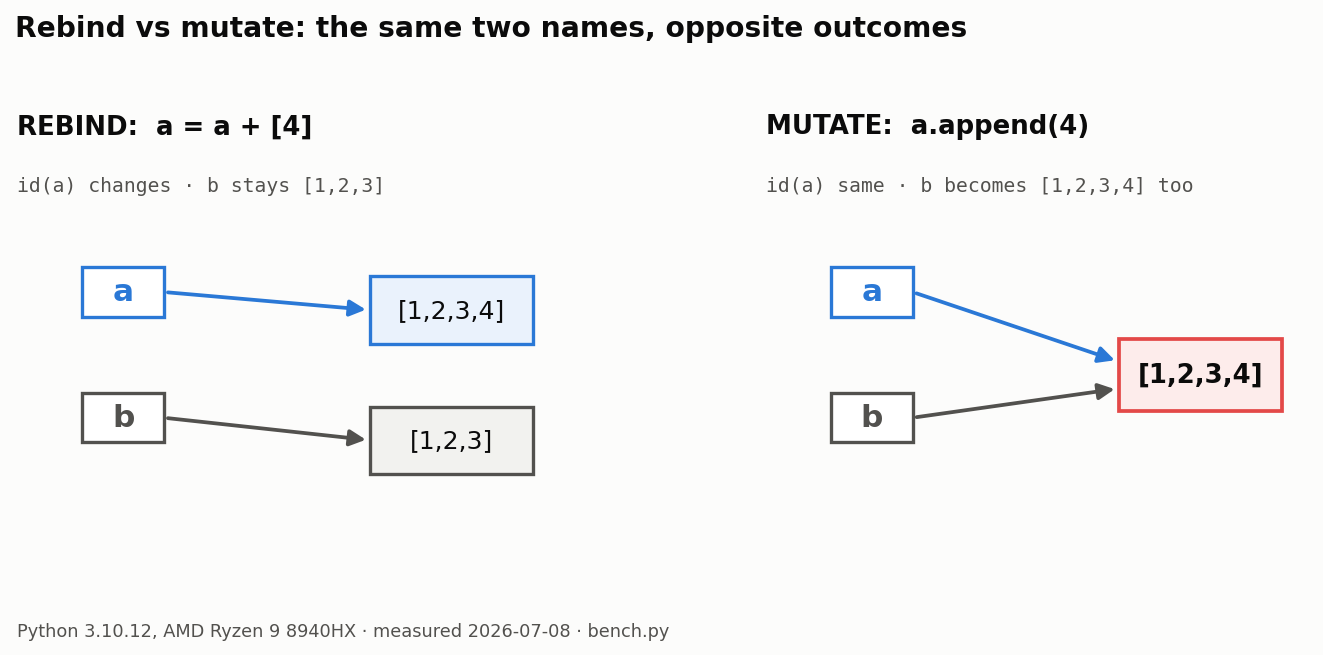
Ask yourself one thing before any line that changes a variable: does it rebind the name, or mutate the object it points at? a = a + [4] rebinds, so other names keep the old list. a.append(4) mutates, so every name on that object sees the change. Same-looking code, opposite result.
Both are easy to watch if you print the ids. Start with a = [1, 2, 3] and b = a, so id(a) == id(b). Two names, one list. Then:
- Rebind:
a = a + [4]builds a new list and pointsaat it.bstays[1, 2, 3].id(a)changed,bnever moved. - Mutate:
a.append(4)edits the existing list in place, sobreads[1, 2, 3, 4]too.id(a)is the same, and both names see it.
The two lines look almost identical and do the opposite thing. That's the whole aliasing trap, right there in four lines.
The Rebind-or-Mutate test. Before any line that changes a variable, ask: does it rebind the name (
=, or+=on something immutable like a number or string) or mutate the object it points at (.append,d[k] = v, a slice assignment,.sort())? If it mutates, every other name on that object sees it. If it rebinds, only this name moves.
The test works because it maps straight onto binding. = always rebinds the name on its left, and never reaches into the object. Methods like .append and item assignments like d[k] = v reach into the object and never touch the name. Immutable things (numbers, strings, tuples) have no mutating methods, so += on them can only rebind. That's why aliasing bugs almost always involve lists, dicts, and sets.
Aliasing is about identity, and Python has an operator for that: is. It's also where the most confusing beginner bug hides.
Why does x is y sometimes lie?
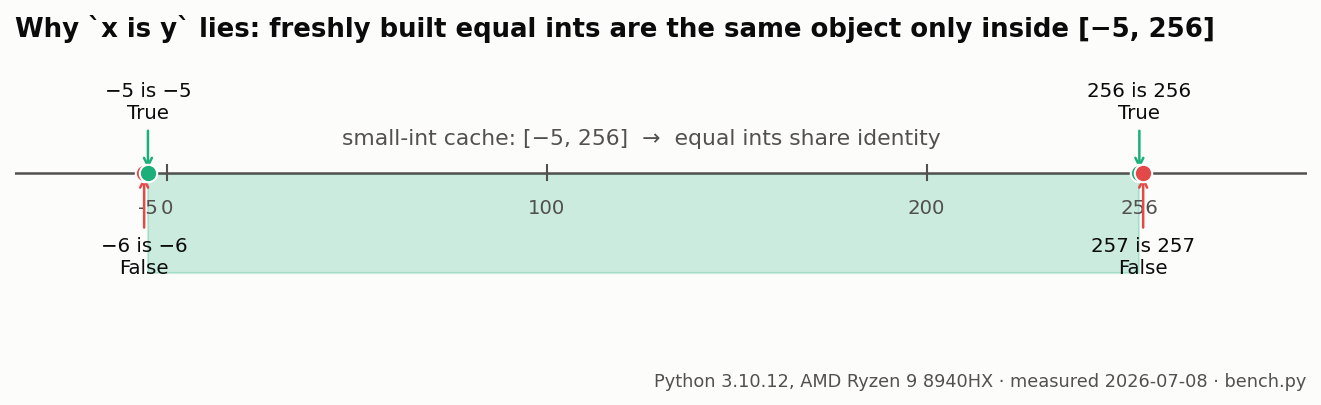
is checks identity, not value. Two variables can be equal and still be different objects. CPython caches small ints from -5 to 256, so 256 is 256 is True but 257 is 257 is False for freshly built ints. Use == when you care about values, and keep is for None.
The boundary is exact. Build two ints the long way so Python can't fold them at compile time: a = int(str(257)); b = int(str(257)). Now a is b is False. The table below has all four edges. Python pre-builds one shared object for every int in [-5, 256], so equal ints in that range share identity, and equal ints outside it don't.
| Expression | Result | Why |
|---|---|---|
256 is 256 | True | inside the [-5, 256] cache |
257 is 257 | False | above the cache, two separate objects |
-5 is -5 | True | bottom of the cache window |
-6 is -6 | False | below the cache |
What about strings and empty containers?
Strings do a similar thing, called interning. "variable" is "variable" is True, because Python interns identifier-shaped literals. Build that text at runtime with "".join([...]) and is goes False. Empty containers split too: () is () is True (the empty tuple is shared), but [] is [] is False, since each [] is a fresh list.
Here's the opinion, and it's not really close: don't teach is to a beginner as an equality check. The small-int cache makes x is y look like == for something like x = y = 5, then it quietly breaks at 257. Use == for values, and save is for the one job it's good at: checking against None, like if result is None.
There's one last place aliasing ambushes people, and it's hiding in a function signature.
The mutable default argument trap
A default argument gets evaluated once, when Python runs the def line, not on every call. So a mutable default is shared across all of them. Run def grow(x, bucket=[]) three times and it hands back ['a', 'b', 'c'], the same list each time. The fix is bucket=None, then build the list inside the function.
It's worth seeing in full, because most beginner tutorials skip it:
def grow(item, bucket=[]):
    bucket.append(item)
    return bucket

grow('a')   # ['a']
grow('b')   # ['a', 'b']   ← not ['b']
grow('c')   # ['a', 'b', 'c']
The default list isn't rebuilt each call. Python makes it once, when it runs the def line, and attaches it to the function. Every call that leaves bucket out reuses that one list, and the returned list has the same id all three times. Each .append mutates the shared default, which is the Rebind-or-Mutate test again, just sprung inside a function signature.
The fix is a two-line idiom you learn once and never forget:
def grow(item, bucket=None):
    if bucket is None:
        bucket = []
    bucket.append(item)
    return bucket
None is immutable, so sharing it across calls does no harm. Inside the function you build a fresh list whenever the caller passed nothing, and bucket is None (that reliable use of is again) is how you check. Same rule for any mutable default: don't use a list, dict, or set there.