
A Python list is the language's built-in ordered, mutable sequence. You create one with square brackets, index from zero, and grow it with append(). The list type ships exactly 11 methods, and this guide backs every speed and memory claim about Python lists with benchmarks you can run yourself (Python 3.10.12, bench.py, measured 2026-07-08).
Key takeaways
- Building 100,000 items with
insert(0)took 1,016.7 ms versus 3.9 ms withappend(), a 264× penalty.collections.deque.appendleftdid the same job in 2.1 ms. - Converting a list to a set pays for itself after just 2 membership checks: a miss costs 53.87 µs on a 10,000-item list versus 0.04 µs on a set.
- Python's sort (Timsort) is adaptive: 1M already-sorted ints sorted in 6.7 ms versus 154.7 ms shuffled, so 23× faster. Reversed input is as fast as sorted.
- A list of 1M ints costs about 36 MB (8 MB of pointers plus ~28-byte int objects).
array('q')stores the same numbers in 8 MB, butsum()runs 3.07× slower on it. - The list type has exactly 11 methods, yet roughly 4 of them (
append,extend,sort,pop) carry most working code.
What are Python lists?
A Python list is the language's built-in ordered, mutable sequence: it keeps insertion order, accepts duplicates, mixes data types, and grows or shrinks freely. You write one with square brackets, like [1, 'two', 3.0], or with the list() constructor. Under the hood it stores references to objects, never the objects themselves.
That last sentence is measurable, not metaphor. sys.getsizeof on a 1M-int list reports 8,000,056 bytes, which is 8.00 bytes per slot: room for a million addresses and nothing else (bench.py). Picture a row of boxes holding addresses. This guide calls that the pointer-box rule, and the copying section shows how it explains five classic bugs at once.
The list is one of Python's four built-in collection types, next to the tuple, the set, and the dict. Mutability is its defining trait, and it costs almost nothing. The same 1M ints weigh 8,000,056 bytes as a list versus 8,000,040 as a tuple (getsizeof, bench.py), a 16-byte gap. Pick the frozen tuple for hashability (that same mutability is why a list can never serve as a dictionary key), not for memory.
One correction before moving on: a highly upvoted Reddit answer on this exact topic claims lists are "immutable by definition," which is exactly backwards. lst[0] = 99 rewrites an element in place, no new list involved.
Next question: How do you create a list in Python?
How do you create a list in Python?
You create a list three ways: a square-bracket literal like nums = [1, 2, 3], the list() constructor on any iterable, or a comprehension. [0] * 5 builds five zeros, but [[0] * 3] * 3 makes three references to ONE row, so build 2-D grids with a nested comprehension.
nums  = [1, 2, 3]        # literal
chars = list("abc")      # constructor: ['a', 'b', 'c']
empty = []               # empty list; list() also works
zeros = [0] * 5          # repetition: [0, 0, 0, 0, 0]
both  = [1, 2] + [3, 4]  # concatenation: [1, 2, 3, 4]
There's a trap in that last sentence. grid = [[0] * 3] * 3 prints like a 3×3 grid, but id() tells the truth. All three rows report the identical id 133423596611008 (bench.py): one row, three addresses. Set grid[0][0] = 9 and the whole grid reads [[9, 0, 0], [9, 0, 0], [9, 0, 0]]. Most nested-list tutorials never mention this.
The fix is a comprehension. [[0] * 3 for _ in range(3)] runs the row-builder expression three separate times, so each row gets its own address. Comprehensions get their own speed test in a later section.
Created a list? Then read it back: How do you access items in a list?
How do you access items in a list?
List items are read by zero-based index: fruits[0] is the first element, fruits[-1] the last. Indexing is O(1), just position arithmetic on a C array. A benchmark read item 999,999 of a million-item list in 16.8 ns; item 7 of a 10-item list took 17.1 ns. A bad index raises IndexError; len(fruits) gives the valid range.
fruits = ["apple", "banana", "cherry"]
fruits[0]    # 'apple'
fruits[-1]   # 'cherry'  (negative indexing counts from the end)
fruits[-2]   # 'banana', plain arithmetic: fruits[len(fruits) - 2]
fruits[3]    # IndexError: list index out of range
len(fruits)  # 3
One conflation to avoid, and you'll see it uncorrected in a popular Reddit thread: reading a list's middle is O(1), but inserting there is O(n). Everything after the slot shifts right, and the measured cost of that shifting lives in the insert(0) benchmark.
Need more than one item at a time? How does list slicing work?
How does list slicing work?
Slicing copies part of a list with list[start:stop:step]: start is included, stop is excluded, and step skips items. So letters[1:4] returns elements 1, 2, and 3. Out-of-range slice bounds never raise; Python clamps them. A bare [:] copies the whole list, and [::-1] returns it reversed.
letters = ["a", "b", "c", "d", "e"]
letters[1:4]    # ['b', 'c', 'd'], index 4 ('e') is excluded
letters[::2]    # ['a', 'c', 'e'], every second item
letters[::-1]   # ['e', 'd', 'c', 'b', 'a']
letters[2:99]   # ['c', 'd', 'e'], no error; 99 clamps to the end
The stop-is-excluded rule trips even big names. freeCodeCamp's slicing walkthrough tells readers 'lemon' gets excluded from a slice whose printed output includes it, an off-by-one in the explanation rather than the code. Trust the rule: the element at stop never appears.
Slices always return a new list, a real allocation, not a view. At 1M items, lst[:] took 2.8 ms and the fresh pointer array weighs 8,000,056 bytes. The reversing slice is worth knowing too: lst[::-1] ran 2.3 ms versus 3.6 ms for list(reversed(lst)). That makes [:] a one-character shallow copy, with the gotchas covered in the copying section.
Time to grow the list: How do you add items to a list?
How do you add items to a list?
append(x) adds one item at the end, insert(i, x) places one at any position, and extend(iterable) adds each element of another collection. Watch the classic mix-up: append(other_list) nests the whole list as a single element. And avoid insert(0) in loops; a benchmark put it 264× slower than append at 100,000 items.
todo = ["write"]
todo.append("test")           # ['write', 'test']
todo.insert(0, "plan")        # ['plan', 'write', 'test']
todo.extend(["ship", "rest"]) # ['plan', 'write', 'test', 'ship', 'rest']
todo.append(["oops"])         # [..., 'rest', ['oops']]  nested, not merged!
+= is just extend in disguise. It mutates the list in place; no new list is built. A few guides assert += is cheaper than + without measuring it, so here's the number. On two 100,000-item lists, a = a + b took 136 µs and a += b just 57 µs. The 2.4× gap is + copying all 200,000 pointers into a brand-new list.
A proofreading note on the append/extend confusion: Programiz's extend() example prints one variable after extending a different one. Its shown output is impossible to reproduce, so run snippets before trusting them.
The 264× figure above isn't a typo. Front-inserting forces the whole array to shift right on every call, and the benchmark section shows the penalty growing with list size.
Adding solved. Now the reverse: How do you remove items from a list?
How do you remove items from a list?
Use remove(x) to delete by value (ValueError if absent); pop(i) deletes by index AND returns the item (IndexError on an empty list or bad index). del lst[i] handles index or slice deletion with no return value, and clear() empties the list in place. pop() with no argument takes the last item.
| Tool | Deletes by | Returns | Raises |
|---|---|---|---|
remove(x) | value (first occurrence) | None | ValueError if x absent |
pop(i=-1) | index (default: last) | the removed item | IndexError on empty list / bad index |
del lst[i] | index or slice | nothing (statement) | IndexError on bad index |
clear() | everything | None | none |
pop()'s default, the last item, is also the fast end. Draining 100,000 items cost 3.2 ms with pop() and 353.7 ms with pop(0): 112× slower, since every front removal shifts the whole array left, which is insert(0)'s mirror image. The decision rule in one line: know the value, use remove; know the index and want the item, use pop. Dropping a slice like del lst[2:5] calls for del; starting over calls for clear.
Signature check for anyone cross-reading tutorials: TutorialsPoint's list page writes pop as pop(obj=list[-1]). That's not Python syntax in any version. The real signature is pop(index=-1), index only.
With editing covered, on to traversal and the loop patterns every script uses: How do you loop through a list in Python?
How do you loop through a list in Python?
You iterate a list directly: for fruit in fruits:, no index counter needed. Use enumerate(fruits) when you also want positions, and zip(names, scores) to walk two lists in parallel. Never add or remove items while looping over the same list; loop over a copy instead. In Python 3, range() replaces the removed xrange().
for i, fruit in enumerate(fruits):   # (0, 'apple'), (1, 'banana'), ...
    print(i, fruit)
for name, score in zip(names, scores):
    print(name, score)
Why the no-mutation rule? bench.py runs the bug so you can watch it. for x in nums: nums.remove(x) over [1, 2, 3, 4, 5, 6] ends with [2, 4, 6] still in the list, so half the elements survive their own deletion loop. Each removal shifts later elements left while the loop's internal index marches on, so the element right after every deletion gets skipped, silently.
Reducers min(), max(), and sum() consume lists directly, and unpacking works too: a, *rest = nums collects leftovers into a new list. Note the twin: *args in a function signature packs a tuple, contrary to what one popular video course teaches. And Google's own Python Class still teaches Python-2 xrange() under a "last updated 2026-01-23" stamp. Verify before copying.
Looping leads straight to ordering: How do you sort a list in Python?
How do you sort a list in Python?
list.sort() orders a list in place and returns None, so x = lst.sort() leaves x empty; sorted(lst) returns a new list and touches nothing. Both accept key= and reverse=True. Python's algorithm is Timsort, and it exploits existing order: a benchmark sorts 1M pre-sorted ints 23× faster than shuffled ones.
Timsort adaptivity, measured on 1M pre-built ints (Python 3.10.12, bench.py):
| Input order | Sort time |
|---|---|
| Already sorted | 6.7 ms |
| Reversed | 6.2 ms |
| Nearly sorted (100 swaps) | 7.0 ms |
| Shuffled | 154.7 ms |
Reversed input costs nothing extra, since Timsort consumes descending runs natively. Two more edges: sorting a mixed str/int list raises TypeError, and strings sort by Unicode code point, so every uppercase letter lands before every lowercase one.
What timing tutorials get wrong (caught 2026-07-08). A first run timed
sorted(range(1_000_000))and reported the sorted-vs-shuffled gap as 6×. The bug: that expression also materializes the range, roughly 20 ms of a 27 ms reading. Re-timed on pre-built lists, the true ratio is 23×. Always check what your stopwatch actually wraps.
Sorting mutates, which raises the sharper question: How do you copy a list without changing the original?
How do you copy a list without changing the original?
b = a never copies a list. Both names now point to one object, so a change shows through both. Make a real copy with a.copy(), a[:], or list(a); those are shallow, still sharing any nested lists. For fully independent nested data use copy.deepcopy(). One model explains all of it: the pointer-box rule.
The pointer-box rule, stated once: a Python list never contains your objects, it holds only their addresses, eight bytes each.
a ─────┐        b = a   (copies this arrow only, nothing else)
       ▼           │
   ┌─────┬─────┬─────┐◄┘
   │ptr 0│ptr 1│ptr 2│     one list: three boxes holding addresses
   └──┬──┴──┬──┴──┬──┘
      ▼     ▼     ▼
    [10]  [20]  [30]       the int objects live elsewhere
Every "separate" list gotcha is this one rule in a different form:
- Aliasing:
b = acopies the top arrow, zero boxes. - Shallow copies:
a.copy(),a[:], andlist(a)copy the boxes but not what they point at, so nested lists stay shared.copy.deepcopy()is the only recursive copy. - The
[[0]*3]*3grid trap: three boxes, one row (creation section). - The 36 MB list: a million boxes plus a million int objects (internals section).
array.array's slow iteration: re-boxing on every read (container section).
The price list, measured at 1M items (bench.py): a[:] 2.8 ms, list(a) 3.1 ms, a.copy() 3.4 ms, and copy.deepcopy(a) 212.9 ms, which is 77× the slice. Hardly any guide bothers to time deepcopy at all. Pay for it only when the nesting is real.
Hardly any guide covers aliasing and deep copies together, and the one that does buries it 17,000 words in. It deserves better placement; this is the bug that costs beginners afternoons.
Speaking of building lists: Are list comprehensions faster than for loops?
Are list comprehensions faster than for loops?
Yes, but modestly: building 1M items took 44.0 ms as a comprehension versus 59.7 ms with for-and-append (1.36× slower) and 64.3 ms with list(map(lambda)) (Python 3.10.12, bench.py). Choose comprehensions for readability on simple transforms; the speed win is a bonus, not a rewrite reason.
| Builder (1M items) | Time | vs comprehension |
|---|---|---|
[x * 2 for x in src] | 44.0 ms | 1.00× |
for loop + append | 59.7 ms | 1.36× |
list(map(lambda x: x * 2, src)) | 64.3 ms | 1.46× |
A couple of guides assert comprehensions are "optimized for performance." Neither shows a number, and honestly, hardly anyone measures it. The table above is a rare actual measurement, and 1.36× on a million items is real but rarely decisive. Take the tie-breaker perk instead: a comprehension's loop variable stays private, so no stray x leaks into the enclosing scope, unlike a plain for loop's.
Where does that 44 ms actually go? How does a Python list work under the hood?
How does a Python list work under the hood?
A CPython list is a dynamic array of pointers (Objects/listobject.c): eight bytes per slot holding addresses, never your objects. It over-allocates as it grows, so 10,000 appends triggered just 47 reallocations, which keeps append() amortized O(1), and len() reads a stored field in O(1).
The over-allocation is a staircase, not a ramp. In one trace (Python 3.10.12), capacity jumps at lengths 1, 5, 9, 17, 25, 33, 41, 53 and so on. Each step buys headroom; the next several appends cost nothing but a pointer write.
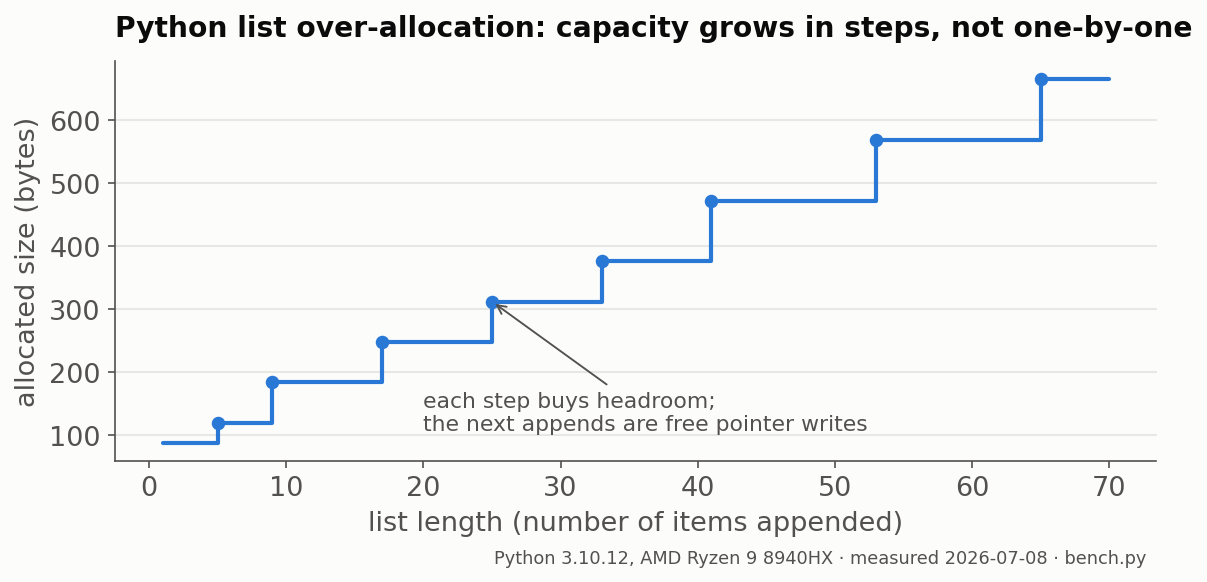
The 8,000,056-byte getsizeof reading from the opening section is this pointer array on the scale, just the boxes. The contents are the expensive part: each small int object weighs about 28 bytes, so the full structure costs roughly 36 MB. The 8 MB list is only about a fifth of the total.
A version note, because this is where tutorials rot: a widely-read 2023 article reports growth steps of 56/88/120/184 bytes without naming a Python version. CPython's growth pattern is an implementation detail; it shifts between releases. Every figure in this section is pinned: Python 3.10.12, 2026-07-08, bench.py. Hardly any guide even mentions listobject.c, and one Reddit thread is the only place that does; no article touches the internals.
That pointer array must shift when you insert at the front, and now the cost has a shape: How slow is insert(0) really?
How slow is insert(0) really?
Building 100,000 items with insert(0) took 1,016.7 ms against 3.9 ms for append(), so 264× slower, because every front insert shifts the whole array right. The penalty compounds with size: 40× at 10k items, 171× at 50k. collections.deque.appendleft did the same job in 2.1 ms.
| N items built | append() | insert(0) | deque.appendleft | insert(0) penalty |
|---|---|---|---|---|
| 10,000 | 0.4 ms | 14.8 ms | 0.3 ms | 40× |
| 50,000 | 2.1 ms | 350.1 ms | 1.5 ms | 171× |
| 100,000 | 3.9 ms | 1,016.7 ms | 2.1 ms | 264× |
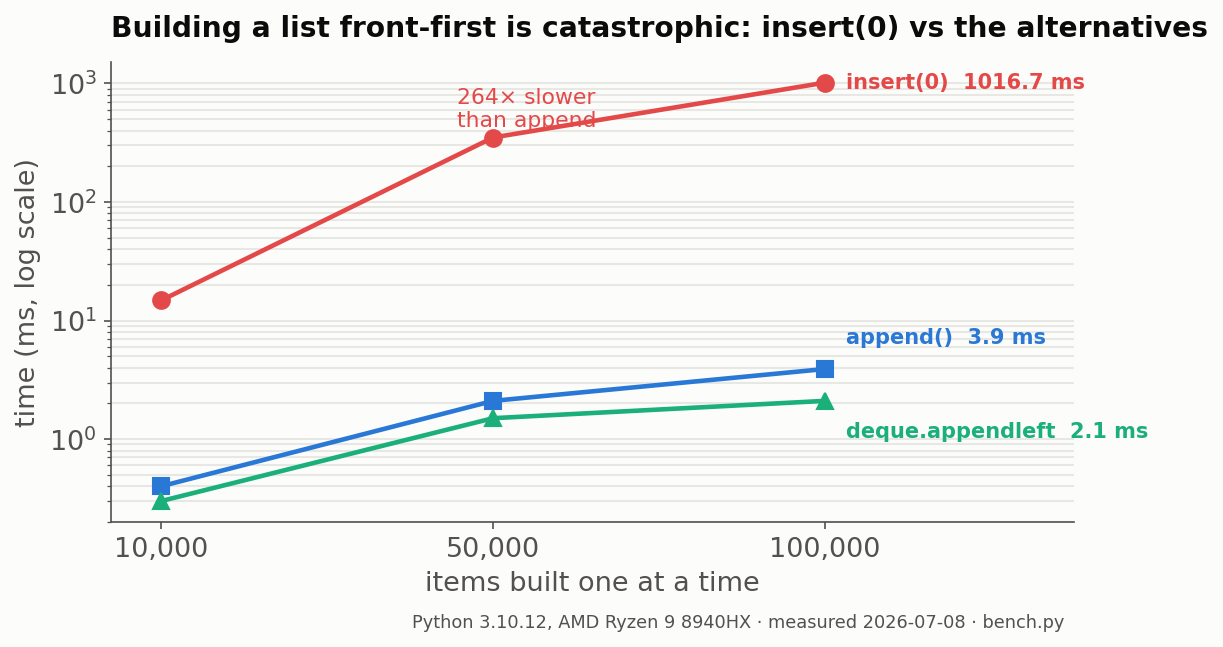
Notice the penalty column climbing: that's quadratic growth, N shifts of an ever-longer array. A few guides assert that "front insertion is slow," yet none of them attaches a number, and the number is the story.
Here's why this bug ships to production: at 10,000 items the damage is 14.8 ms, invisible. At 100,000 it crosses one full second. insert(0) in a loop is, honestly, the most common accidental O(n²) in beginner Python, and the fix is one import: from collections import deque, then appendleft().
Front-inserts are one list misuse; scanning is the other: When should you use a set instead of a list?
When should you use a set instead of a list?
Convert to a set when you'll test membership more than once. A missing-item check on a 10,000-item list took 53.87 µs versus 0.04 µs on a set, and building the set costs about two list scans. The break-even stayed at two lookups from 1,000 to 10,000 items, and three at 100,000.
Worst-case membership miss, measured (Python 3.10.12, bench.py):
| N | x in list (miss) | set() conversion | x in set (miss) | Break-even |
|---|---|---|---|---|
| 1,000 | 5.28 µs | 9.56 µs | 0.04 µs | 2 lookups |
| 10,000 | 53.87 µs | 94.58 µs | 0.04 µs | 2 lookups |
| 100,000 | 569.33 µs | 1,223.52 µs | 0.04 µs | 3 lookups |
The decision rule: one membership test, keep the list, x in lst is fine. Two or more, convert once with s = set(lst) and check against s. The list scan is O(n), so every element gets inspected on a miss; the set lookup hashes straight to its bucket in constant time.
One guide says "use a set for heavy membership testing" without ever stating a threshold; these measurements put the threshold at two.
Caveat: list(set(x)) dedupes but scrambles order. Order-preserving routes cost little, measured on 100,000 values (50,000 distinct): list(set(x)) 2.2 ms, list(dict.fromkeys(x)) 3.1 ms, the classic seen-set loop 4.8 ms. Keeping order costs about one extra millisecond per 100k values; pay it.
Sets are one alternative of several: Which container should you use: list, tuple, set, deque, or array?
Which container should you use: list, tuple, set, deque, or array?
Run the container triage test: mutate mostly at the end, use a list; push and pop at both ends, use collections.deque; mostly membership checks, use a set (pays after ~2 lookups); millions of numbers, use NumPy. array.array cut memory 4.5× in one test, 8 MB vs 36 MB per 1M ints, but summed 3.07× slower.
The container triage test, three questions:
- Do you push or pop at both ends? Use
collections.deque. - Do you mostly test membership? Use a set; it pays for itself after about two lookups.
- Are you holding millions of numbers? Use NumPy.
Three no's, and the Python list is the right default. A tuple is the list's frozen sibling, so pick it for fixed records and dict keys, not for savings: 1M ints weigh 8,000,040 bytes as a tuple versus 8,000,056 as a list (getsizeof, bench.py). A dict maps keys to values, a different job entirely.
| Container | Ordered | Mutable | Built for | Measurement |
|---|---|---|---|---|
| list | yes | yes | end-mutation, indexing | 100k appends in 3.9 ms |
| tuple | yes | no | fixed records, dict keys | 1M ints: 8,000,040 B vs list's 8,000,056 B |
| set | no | yes | membership tests | miss: 0.04 µs vs 53.87 µs (10k list) |
collections.deque | yes | yes | stacks AND queues (both ends) | 100k appendleft in 2.1 ms vs 1,016.7 ms for insert(0) |
array.array('q') | yes | yes | compact numeric storage | 8.0 MB vs 36 MB per 1M ints; sum() 14.6 ms vs 4.8 ms |
Two verdicts from the table: queues and array.array
First, a correction: Mimo's page recommends lists "for queues," but the official Python docs say the opposite, because dequeuing from a list's front shifts every remaining element; queues belong to deque. (As a stack, append and pop at the end, a list is perfect.)
Second, an opinion: array.array is oversold. Tutorials file it under "efficient," and the memory win is real, 4.5×. But iterating re-boxes every element into a Python int (the pointer-box rule working against you), so sum() ran 3.07× slower. Stay with list, or jump to NumPy. array is for I/O buffers and wire formats.
One question left: Which list methods do you actually need?
Which list methods do you actually need?
Python lists have exactly 11 methods, but roughly four carry working code: append, extend, sort, and pop. The reference table below covers all 11 with what each returns and which error it raises: ValueError for remove/index, IndexError for pop. cmp() and sort(func) are Python 2; they no longer exist.
| Method | Does | Returns | Raises |
|---|---|---|---|
append(x) | adds x at the end | None | none |
extend(it) | appends each element of it | None | none |
insert(i, x) | inserts x at index i | None | none |
remove(x) | deletes first occurrence of x | None | ValueError if absent |
pop(index=-1) | deletes and returns item at index | the item | IndexError if empty/bad index |
clear() | empties the list in place | None | none |
index(x) | finds first position of x | int | ValueError if absent |
count(x) | counts occurrences of x | int | none |
sort(key=, reverse=) | orders in place | None | TypeError on unorderable mix |
reverse() | reverses in place | None | none |
copy() | shallow-copies | new list | none |
Note the None column: every mutating method returns None by design, across all of Python's mutable types, which is the trap behind x = lst.sort(). Version check, same table: cmp(list1, list2) or sort([func]) in a tutorial means Python 2, and TutorialsPoint's current page shows both. In Python 3, cmp() is gone and sort() takes keyword arguments only.
The contrarian close: most tutorials table all 11 methods and stop. Honestly, memorize four and spend the saved effort on slicing fluency: [:], [::-1], [start:stop] do daily work no method covers.
Numbers cited throughout come from one script: How this guide was made.
How this guide was made
Every benchmark number in this article comes from bench.py, a single-file, dependency-free Python script run on 2026-07-08 under Python 3.10.12, Linux 6.17.0-35-generic, on an AMD Ryzen 9 8940HX. The runs were machine-executed by an AI-assisted authoring pipeline, so no figure here is a human anecdote, and none should be read as one. Random seeds are fixed (random.Random(42)); the raw output ships alongside the script as bench-results.txt. You can reproduce everything with one command: python3 bench.py.